This article provides detailed explanation on queue data structure, the operations that can be performed on the queue, a diagrammatic representation of the queue in general. It also provides code implementation using java.util.Queue interface and discusses the applications of queue.
Prerequisites :
Knowledge of Java and basic understanding of data structures is required.
Explanation :
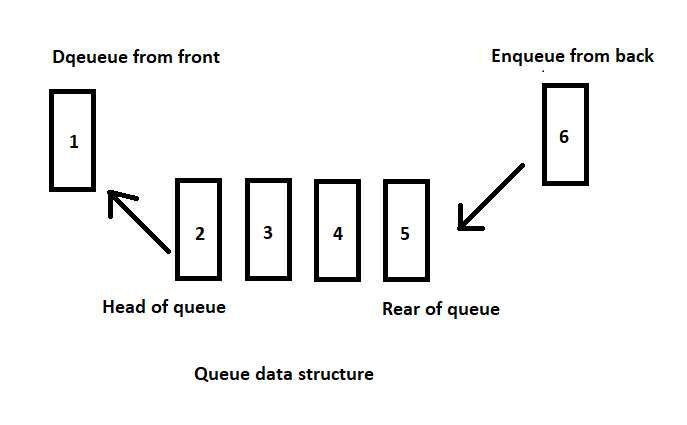
Queue interface in Java is available from java.util package. It extends Collection interface. Unlike Stack which works in LIFO i.e Last In First Out manner, the queue interface works in FIFO i.e First In First Out manner. A simple example of queue can be a queue at a ticket booking window. The first person who comes in the queue is the one who gets the service and is the first person to leave the queue. And the last person who joins the queue is the last person to leave the queue.
Queue interface in Java works with few restrictions while processing the elements it stores. An element can be inserted only at the back/tail/rear end of the queue which is known as the enqueue operation and an element can be removed only from the front/head end of the queue which is known as the dequeue operation.
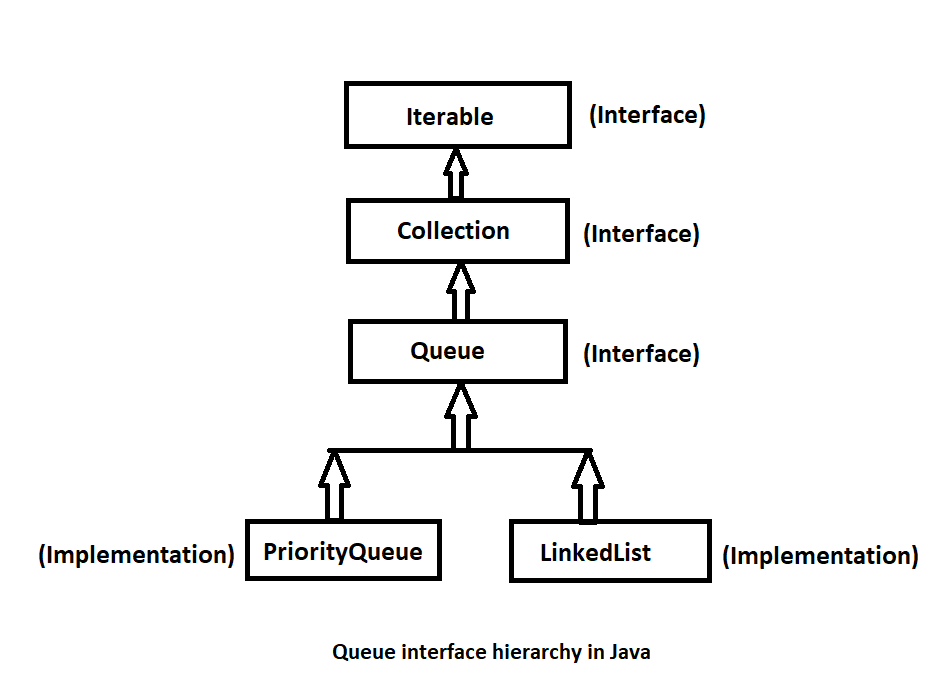
Being an interface, Queue needs concrete class for the declaration and the most common classes are PriorityQueue and LinkedList in Java. In our code example below we will be using LinkedList concrete implementation class.
Operations that can be performed on the queue :
- boolean add(E e) : Adds an element to the back/tail of the queue if the queue is not full and returns true upon success, else throws IllegalArgumentException if the queue is full and add operation cannot be performed.
- boolean offer(E e) : This method is similar to the above add method. The only difference is this method returns false if the queue is full instead of throwing any exception.
- E peek() : Returns the head element of the queue if the queue is not empty, else returns null.
- E element() : This method is similar to the above peek method. The only difference is it throws an exception if the queue is empty. It returns the head element if the queue is not empty.
- E poll() : Removes and returns the head element of the queue if the queue is not empty. Returns null if the queue is empty.
- E remove() : This method is similar to the above poll method except that it throws exception if the queue is empty. Removes and returns the head element if the queue is not empty.
- int size() : java.util.Queue interface extends the java.util.Collection interface hence this method of Collection interface is available in the Queue interface. This method returns the number of elements present in the queue.
- boolean isEmpty() : This method is again from the Collection interface and it returns true if the queue is empty, else returns false.
Code implementation :
import java.util.LinkedList;
import java.util.Queue;
public class QueueInterfaceImpl {

	public static void main(String[] args) {
		Queue<Integer> queue = new LinkedList<Integer>();

		/*
		 * throws IllegalArgumentException if the queue is full else returns
		 * true
		 */
		boolean addOne = queue.add(1);

		boolean addTwo = queue.add(2);

		/*
		 * returns true if the element is added to the queue else returns false
		 */
		boolean addThree = queue.offer(3);
		boolean addFour = queue.offer(4);

		/* returns null if the queue is empty else the head of the queue */
		int headOfQueue = queue.peek();
		System.out.println("Head of the queue is = " + headOfQueue);

		/* similar to peek but throws exception if the queue is empty */
		int headOfQueue1 = queue.element();

		/* returns null if the queue is empty */
		int poppedElement = queue.poll();
		System.out.println("Element popped = " + poppedElement);

		/* similar to poll but throws an exception if the queue is empty */
		int poppedElement1 = queue.remove();
		System.out.println("Element popped = " + poppedElement1);

		System.out.println("Size of the queue is = " + queue.size());

		System.out.println("Is queue empty = " + queue.isEmpty());

		int poppedElement2 = queue.poll();
		int poppedElement3 = queue.poll();

		System.out.println("Is queue empty = " + queue.isEmpty());

		/*
		 * try removing element when queue is empty using remove and it throws
		 * exception
		 */
		int poppedElement4 = queue.remove();

	}

}
Output of above code :
Head of the queue is = 1
Element popped = 1
Element popped = 2
Size of the queue is = 2
Is queue empty = false
Is queue empty = true
Exception in thread “main” java.util.NoSuchElementException
at java.util.LinkedList.removeFirst(Unknown Source)
at java.util.LinkedList.remove(Unknown Source)
at leetcode.examples.QueueInterfaceImpl.main(QueueInterfaceImpl.java:46)
Applications of queue data structure :
Queue is useful in the scenarios when the job is to be performed in FIFO manner. Common examples are,
- When multiple processes require CPU at the same time, various CPU scheduling algorithms used are implemented using queue data structure.
- In the printer job, the print commands are processed in FIFO manner. The first print job that is scheduled by the user will be printed first.
- In real life scenario, the call center system uses the queue mechanism in case of assigning the executives to the waiting customers.
Here is the link to the code on my github profile, Queue interface in Java.
Thank you for reading. I hope it helped you to learn some useful concept about queue data structure in Java. Your feedback is highly appreciated.
 Data structures and algorithms in Java